Instagram Carousel Download: Save Every Slide (2026)
Instagram carousel download made simple: copy the post link, paste it, and save every photo or video slide in high quality. Works on phone and PC.
Read article
Save public Instagram photos in full size, including every slide of a multi-image post.
Carousel posts list each image separately.
Not affiliated with Instagram or Meta. By using this tool you agree to our Terms of Service and Privacy Policy.
One link is enough, even for posts with many slides.
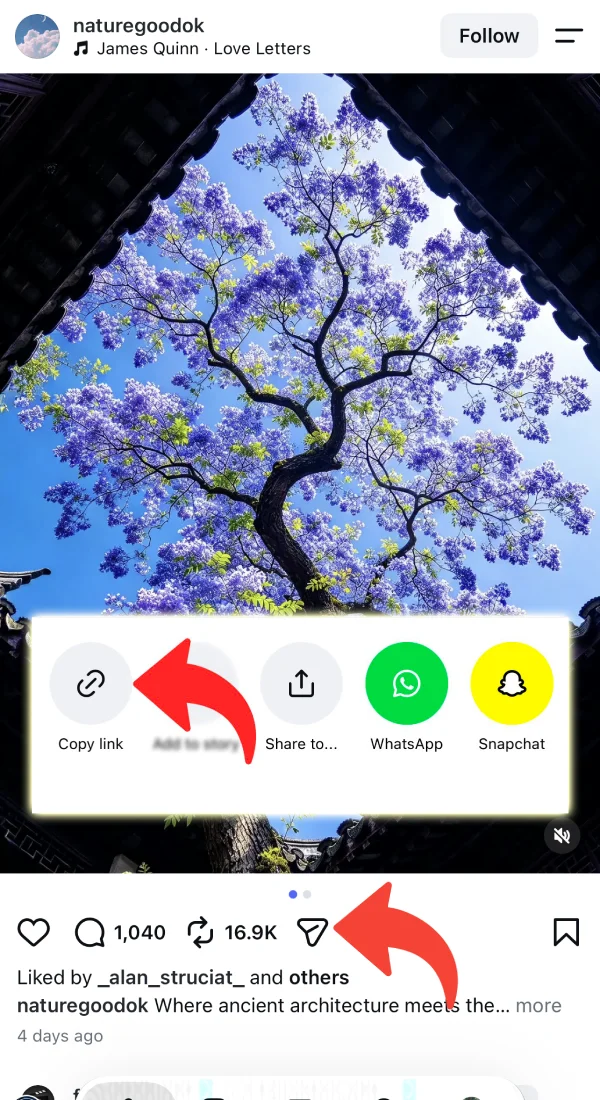
Open the photo or carousel in Instagram, tap the share icon and choose Copy link.
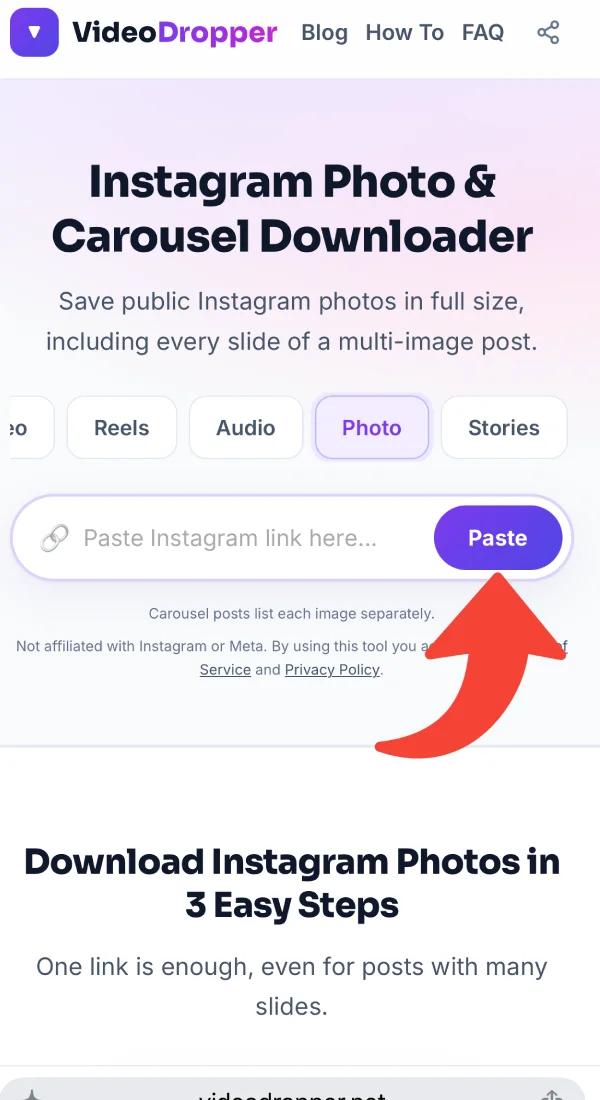
Paste it into the box above. We look up the post and load a preview of each image.
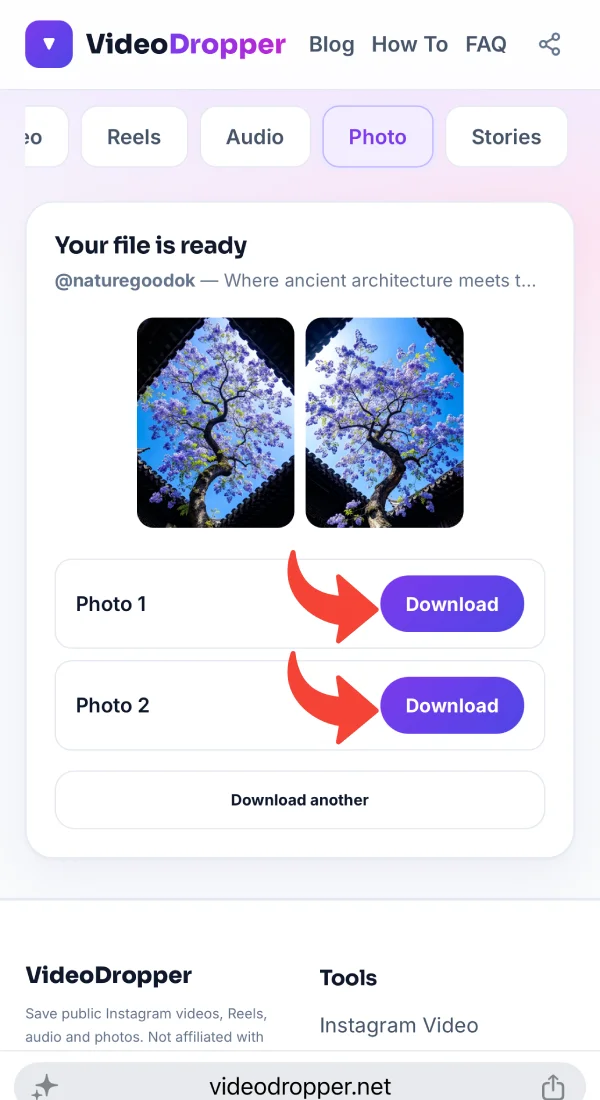
Tap Download under any image to save it as a JPG. Repeat for each slide you want.
Practical tips, tutorials, and strategies to elevate your Instagram experience.
 Instagram Photos9 min read
Oct 25, 2026 • 9 min read
Instagram carousel download made simple: copy the post link, paste it, and save every photo or video slide in high quality. Works on phone and PC.
 Guides9 min read
Oct 24, 2026 • 9 min read
Use an Instagram photo downloader to save Instagram photos and download Instagram images in full size. Free steps for iPhone, Android, PC and Mac.
 Audio6 min read
Oct 19, 2026 • 6 min read
Why the MP3 you save from Instagram can sound flat, thin or different from what you expected, and what a 320 kbps file can and can’t do about it.
 Audio4 min read
Oct 19, 2026 • 4 min read
Learn how to turn a public Instagram reel into a 320 kbps MP3 file, with clear steps, common problems, and what quality to expect.
 Guides5 min read
Oct 14, 2026 • 5 min read
Copy the Instagram link, paste it into VideoDropper in your browser, and save the MP4 on Windows or Mac. Includes where the file ends up and what to try if it doesn’t download.
 Guides4 min read
Oct 14, 2026 • 4 min read
Copy the link, paste it into VideoDropper in Chrome, and save the video to your Android phone. Includes how to find it in your gallery and what to do when it doesn’t show up.
A screenshot captures your screen, not the photo: you get the app's buttons, a lower resolution and soft edges. Downloading the real image file gives you the picture at the size Instagram stored it.
For carousel posts, VideoDropper lists every slide it finds, so you can save one favourite or the whole set. Posts that mix photos and videos show both.
Only public posts work. Photos belong to their creators — keep them for personal reference and ask before you reuse them.
A screenshot looks like a shortcut, but it records your screen, not the photo. You end up with interface buttons, a lower resolution and edges cropped by your phone's display.
Downloading the actual image file gives you the picture the way Instagram stored it. Here is why that matters:
You get the image file itself, not a capture of the app, so there are no buttons, captions or status bars sitting on top of the picture.
Multi-image posts list each slide, which saves you from taking and cropping a new screenshot for every swipe.
A proper image file holds up better as a wallpaper, a print or a presentation slide than a cropped screenshot of the same photo.
Designers, photographers and planners collect reference images. Files in a folder are easier to sort and search than a pile of screenshots.
Posts get deleted, archived or hidden. A personal copy of a photo you are allowed to keep stays with you for reference.
Download for personal reference and ask before you repost. When sharing is allowed, tag and credit the person who took the photo.
Copy the post link, open VideoDropper in Safari, paste it and tap Download under a photo. Confirm the prompt, then open the Files app and share the image to Photos if you like.
Copy the post link, paste it here in Chrome and tap Download under each photo. The JPG files go to Downloads and show up in your gallery.
Copy the post address, paste it above and click Download under each image. Your browser saves the JPG files to your downloads folder.
Simple, private and full resolution.
You get the image file at the resolution Instagram stores, not a cropped screenshot of your screen.
Posts with many slides list each image, so you can pick the ones you want to keep.
See a thumbnail before you download, so you only save the shots you actually need.
If a carousel includes videos, they appear alongside the photos in the same result.
No Instagram login and no stored files. We only fetch public posts you paste in.
Phone, tablet or computer, any modern browser. Nothing to install.
Real feedback from people who use VideoDropper to save Instagram media.
“Awesome, no ads, easy & free downloading.”
“Good, fast, free and easy to save reels.”
“I just found a great Instagram Reels downloader! Fast downloads, good quality, and super easy to use. Definitely worth trying!”
“Very easy way to download audio from a reel, within seconds got the mp3 file.”
“Been looking for a reliable Instagram downloader like this for ages! No unnecessary ads, no confusing steps, just fast downloads with audio and great quality. Definitely makes saving Reels so much easier!”
“This tool is a total lifesaver! 🔥 I can download Instagram Reels with audio in just a couple of seconds without dealing with sketchy websites. Simple, fast, and exactly what I needed!”
Help us improve VideoDropper • Takes less than 1 minute
Quick answers about VideoDropper.
You get the image at the highest resolution Instagram provides for that post. Instagram resizes uploads, so this can be smaller than the camera original.
Paste the post link. Each slide appears as its own image with its own Download button.
JPG.
No. Only public posts are supported.
Instagram compresses and resizes uploaded photos, so the largest file it stores can be smaller than the original.
Not without the creator's permission. Photos belong to the people who took them.